Android Upload Image
Hi FriendToday i am going to explain how to upload image on application server using android.
There are two part for creating such type application.
1. Server part
2.android application creation
Server Part :
To work with Application Server you required knowledge about server programming language (like jsp, php, Asp etc). i have used PHP script.Step 1:
Open any text editor and write php script code that written below and save with index.php and also create a folder named uploads location C:\xampp\htdocs\
$file_path = "uploads/";
$file_path = $file_path . basename( $_FILES['uploaded_file']['name']);
if(move_uploaded_file($_FILES['uploaded_file']['tmp_name'], $file_path)) {
echo "success";
} else{
echo "fail";
}
?>
Android Application creation
Step 2:Create an android applcation.

android:orientation="vertical"
android:layout_width="fill_parent"
android:layout_height="fill_parent"
>
Now we are going to create .java file
package in.androidshivendra.fileupload;
import java.io.DataOutputStream;
import java.io.File;
import java.io.FileInputStream;
import java.net.HttpURLConnection;
import java.net.MalformedURLException;
import java.net.URL;
import android.app.Activity;
import android.app.ProgressDialog;
import android.os.Bundle;
import android.util.Log;
import android.view.View;
import android.view.View.OnClickListener;
import android.widget.Button;
import android.widget.TextView;
import android.widget.Toast;
public class UploadToServer extends Activity {
TextView messageText;
Button uploadButton;
int serverResponseCode = 0;
ProgressDialog dialog = null;
String upLoadServerUri = null;
/********** File Path *************/
final String uploadFilePath = "/mnt/sdcard/";
final String uploadFileName = "a.jpg";
@Override
public void onCreate(Bundle savedInstanceState) {
super.onCreate(savedInstanceState);
setContentView(R.layout.activity_upload_to_server);
uploadButton = (Button)findViewById(R.id.uploadButton);
messageText = (TextView)findViewById(R.id.messageText);
messageText.setText("Uploading file path :- '/mnt/sdcard/"+uploadFileName+"'");
/************* Php script path ****************/
upLoadServerUri = "http://10.0.2.2/index.php";
// here 10.0.2.2 is url for local server when you run on emulator.
uploadButton.setOnClickListener(new OnClickListener() {
@Override
public void onClick(View v) {
dialog = ProgressDialog.show(UploadToServer.this, "", "Uploading file...", true);
new Thread(new Runnable() {
public void run() {
runOnUiThread(new Runnable() {
public void run() {
messageText.setText("uploading started.....");
}
});
uploadFile(uploadFilePath + "" + uploadFileName);
}
}).start();
}
});
}
public int uploadFile(String sourceFileUri) {
String fileName = sourceFileUri;
HttpURLConnection conn = null;
DataOutputStream dos = null;
String lineEnd = "\r\n";
String twoHyphens = "--";
String boundary = "*****";
int bytesRead, bytesAvailable, bufferSize;
byte[] buffer;
int maxBufferSize = 1 * 1024 * 1024;
File sourceFile = new File(sourceFileUri);
if (!sourceFile.isFile()) {
dialog.dismiss();
Log.e("uploadFile", "Source File not exist :"
+uploadFilePath + "" + uploadFileName);
runOnUiThread(new Runnable() {
public void run() {
messageText.setText("Source File not exist :"
+uploadFilePath + "" + uploadFileName);
}
});
return 0;
}
else
{
try {
// open a URL connection to the Servlet
FileInputStream fileInputStream = new FileInputStream(sourceFile);
URL url = new URL(upLoadServerUri);
// Open a HTTP connection to the URL
conn = (HttpURLConnection) url.openConnection();
conn.setDoInput(true); // Allow Inputs
conn.setDoOutput(true); // Allow Outputs
conn.setUseCaches(false); // Don't use a Cached Copy
conn.setRequestMethod("POST");
conn.setRequestProperty("Connection", "Keep-Alive");
conn.setRequestProperty("ENCTYPE", "multipart/form-data");
conn.setRequestProperty("Content-Type", "multipart/form-data;boundary=" + boundary);
conn.setRequestProperty("uploaded_file", fileName);
dos = new DataOutputStream(conn.getOutputStream());
dos.writeBytes(twoHyphens + boundary + lineEnd);
dos.writeBytes("Content-Disposition: form-data; name=uploaded_file;filename="+ fileName + "" + lineEnd);
dos.writeBytes(lineEnd);
// create a buffer of maximum size
bytesAvailable = fileInputStream.available();
bufferSize = Math.min(bytesAvailable, maxBufferSize);
buffer = new byte[bufferSize];
// read file and write it into form...
bytesRead = fileInputStream.read(buffer, 0, bufferSize);
while (bytesRead > 0) {
dos.write(buffer, 0, bufferSize);
bytesAvailable = fileInputStream.available();
bufferSize = Math.min(bytesAvailable, maxBufferSize);
bytesRead = fileInputStream.read(buffer, 0, bufferSize);
}
// send multipart form data necesssary after file data...
dos.writeBytes(lineEnd);
dos.writeBytes(twoHyphens + boundary + twoHyphens + lineEnd);
// Responses from the server (code and message)
serverResponseCode = conn.getResponseCode();
String serverResponseMessage = conn.getResponseMessage();
Log.i("uploadFile", "HTTP Response is : "
+ serverResponseMessage + ": " + serverResponseCode);
if(serverResponseCode == 200){
runOnUiThread(new Runnable() {
public void run() {
String msg = "File Upload Completed.\n\n See uploaded file here : \n\n"
+" http://www.androidtrainer.netne.net.com/uploads/"
+uploadFileName;
messageText.setText(msg);
Toast.makeText(UploadToServer.this, "File Upload Complete.",
Toast.LENGTH_SHORT).show();
}
});
}
//close the streams //
fileInputStream.close();
dos.flush();
dos.close();
} catch (MalformedURLException ex) {
dialog.dismiss();
ex.printStackTrace();
runOnUiThread(new Runnable() {
public void run() {
messageText.setText("MalformedURLException Exception : check script url.");
Toast.makeText(UploadToServer.this, "MalformedURLException",
Toast.LENGTH_SHORT).show();
}
});
Log.e("Upload file to server", "error: " + ex.getMessage(), ex);
} catch (Exception e) {
dialog.dismiss();
e.printStackTrace();
runOnUiThread(new Runnable() {
public void run() {
messageText.setText("Got Exception : see logcat ");
Toast.makeText(UploadToServer.this, "Got Exception : see logcat ",
Toast.LENGTH_SHORT).show();
}
});
Log.e("Upload file to server Exception", "Exception : "
+ e.getMessage(), e);
}
dialog.dismiss();
return serverResponseCode;
} // End else block
}
}
Required Permission are:
i. android.permission.READ_EXTERNAL_STORAGE
ii. android.permission.INTERNET
To run this example you have to put an image file name a.jpg in sdcard.
Step 3: Send image in emulator sdcard.
i. start emulator and open file explorer by this way:-ii. click on windows-> showview-> other-> android-> fileexplorer
iii. you got window like this

Now Run Application :-

Image Upload Process start
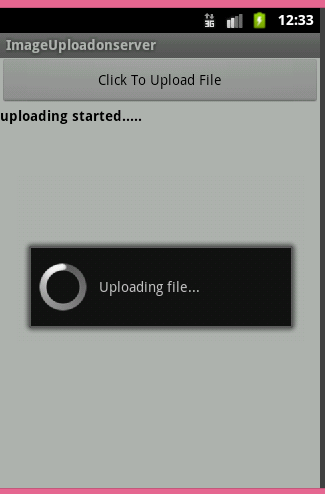
Image Uploading complete.

Basically your file is store in C:\xampp\htdocs\uploads folder
NOTE: THIS APPLICATION ONLY RUN WITH EMULATOR, to test this application on phone or blue stack then you have to chage Image path.
final String uploadFilePath = "/mnt/sdcard/";
final String uploadFileName = "a.jpg";according to current file location.

